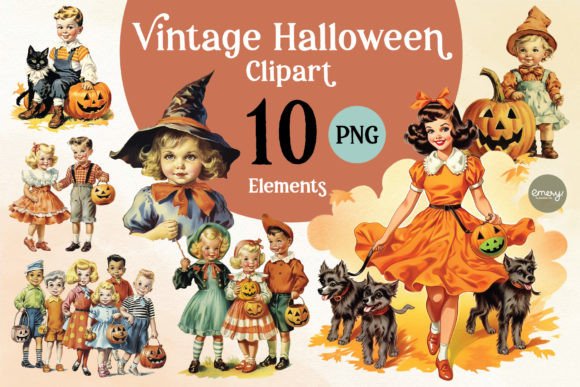
Vintage Halloween Cliparts PNG: Spooky Elegance for Designers
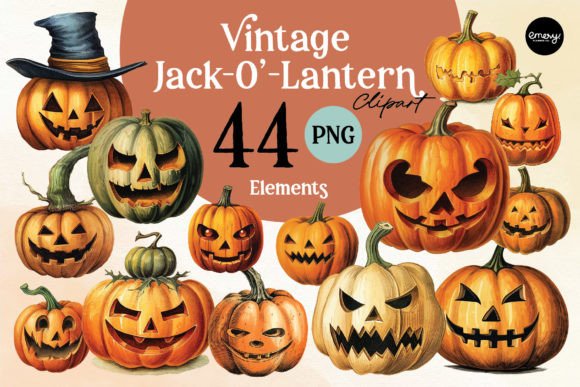
There is a specific type of nostalgia associated with Halloween that modern, hyper-realistic graphics often fail to capture. It isn't about jump scares or gore; it is about the warm, amber glow of a jack-o'-lantern on a porch step and the textured feel of a cardboard skeleton hanging in a window. This collection of Vintage Halloween Cliparts PNG taps directly into that retro aesthetic. These designs are not just generic holiday images; they are carefully curated assets that bridge the gap between mid-century charm and modern digital utility. For the creative professional, entrepreneur, or hobbyist, these files offer a distinct visual personality that stands apart from the saturated market of neon greens and cartoon ghosts.
The Retro Aesthetic and Its Visual Appeal
When we talk about "vintage" in the context of design assets, we are referring to a specific visual language. The Vintage Halloween Cliparts PNG collection leans heavily into a style that evokes the golden age of illustration. Think of the warmth of lithograph printing, the slight grain of ink on paper, and the whimsical character designs of the 1950s and 60s. These aren't just vector-perfect, sterile shapes; they possess a texture and depth that give them a hand-crafted feel.
The appeal lies in the details. Whether it is a black cat with arched back, a grinning skeleton, or a classic witch silhouette, the style is accessible and friendly rather than dark or menacing. This "spooky-cute" aesthetic is incredibly versatile. For a brand identity or a small business, using these graphics signals a sense of warmth, nostalgia, and personality. It moves away from the aggressive, high-contrast look of modern minimalism and offers a softer, more approachable visual narrative. This is the kind of premium font and asset energy that resonates with audiences looking for authenticity and charm.
Practical Applications: From Screen to Print
The utility of a high-quality graphic set lies in its flexibility. Because these are provided as 3000x3000 pixel files at 300 DPI with transparent backgrounds, they function as professional-grade design assets. This resolution is crucial for high-fidelity output. You are not limited to web design; these files are robust enough for large-format printing.
Here is how different professionals can integrate these assets into their workflows:
- Packaging Design & Sublimation: For entrepreneurs in the sublimation market, these are ready-to-press assets. The transparency allows for seamless integration onto mugs, tote bags, and phone cases without the hassle of removing white backgrounds. The vintage style translates beautifully onto physical products, giving them a boutique or artisanal feel rather than a mass-produced look.
- Editorial Design & Publishing: Bloggers and magazine editors can use these as spot illustrations to break up text-heavy layouts. In editorial design, a vintage clipart can serve as a thematic anchor for an article about fall recipes, costume ideas, or local history. They pair exceptionally well with serif fonts for a classic look or sans serif fonts for a modern, eclectic contrast.
- Social Media Graphics & Marketing: In the fast-paced world of social media graphics, stopping the scroll is essential. The textural quality of these vintage images stands out against the slick, digital perfection of typical Instagram feeds. Use them for stickers in Stories, backgrounds for quotes, or focal points in event announcements.
- Wall Decor & Frame Artwork: Because of the high resolution, these images can be scaled to create digital downloads for Etsy shops or printed directly as wall art. A set of four vintage Halloween illustrations in simple black frames makes for sophisticated seasonal decor that appeals to adults who prefer tasteful holiday styling.
Strategic Design and Pairing Advice
Integrating vintage assets into a modern project requires a thoughtful approach to visual hierarchy and typography. The goal is to create a cohesive look, not a cluttered scrapbook. When working with the Vintage Halloween Cliparts PNG, consider the interplay between the image and your text elements.
If you are creating a poster or a card, the clipart often serves as the hero element. To let it shine, pair it with a typeface that complements its era without competing for attention. A script font or a handwritten font can mimic the organic feel of the illustrations, creating a harmonious, hand-made aesthetic. However, if you want a more contemporary edge, try pairing these vintage images with a bold, geometric sans serif font. This contrast between old and new creates a dynamic tension that is very popular in current modern typography trends.
It is also important to consider the color palette of your surrounding design. Since these are PNG files, they will sit on top of your chosen background. Vintage designs often look best against muted, earthy tones—think kraft paper beige, deep charcoal, muted sage, or cream. Avoiding overly bright, neon backgrounds will help maintain the authentic, retro vibe of the clipart. This attention to detail elevates the work from a simple hobby project to professional commercial font and asset usage.
Technical Specifications and Workflow Tips
While the creative possibilities are vast, the technical foundation of these files ensures they are ready for professional use. The inclusion of 10 separate PNG files provides variety, allowing you to create a cohesive set of materials—such as matching party invitations, favor tags, and thank you cards—without repeating the same image too frequently.
A few practical notes for your workflow:
- File Management: As noted, you will need a computer to unzip the files. This is standard for large, high-resolution assets. Once unzipped, I recommend organizing them in a dedicated library within your design software (like Adobe Illustrator, Procreate, or Canva) for easy access.
- Color Adjustments: While the colors provided are beautiful, the PNG format allows for easy editing. If the vintage orange is too warm for your specific brand palette, you can apply a hue/saturation adjustment layer in Photoshop to shift the tone to a burnt sienna or a muted gold without destroying the file integrity.
- Readability: If you are placing text over a particularly "busy" section of a clipart, ensure you maintain readability. You might need to lower the opacity of the image slightly or place a semi-transparent shape behind your text to create separation.
Ultimately, Vintage Halloween Cliparts PNG are more than just seasonal decorations; they are tools for storytelling. They allow you to tap into a specific emotional register—nostalgia, comfort, and festive fun—that resonates deeply with audiences. Whether you are a graphic designer working on a client brief or a hobbyist making treats for a school party, these assets provide a reliable, high-quality foundation for your creative vision. By respecting the vintage aesthetic and pairing it with smart, modern design choices, you can create products and visuals that feel both timeless and fresh.